Zoho Procurement Implementation Guide
Managing business purchasing across multiple teams, suppliers, and approval levels can quickly become a bottleneck. When rely on manual spreadsheets and email chains, simple purchases often turn into missed approvals, duplicate orders, unexpected delays, and zero visibility into company spending.
Zoho Procurement solves this by unifying and automating your entire procurement lifecycle on a single source-to-pay platform. From purchase requisitions and strategic sourcing to automated purchase orders and accounts payable, it brings complete transparency to your spend.
In this guide, we will walk you through what procurement management is, how implementing Zoho Procurement can transform your business operations, key platform features, pricing, support options, and how to set it up for success.
What is Procurement Management?
Procurement Management is the end-to-end process of planning, sourcing, approving, purchasing, receiving, and tracking the goods and services your business needs to operate efficiently.
A structured procurement process allows modern organizations to:
- Control direct and indirect spending to prevent budget overruns.
- Build stronger vendor relationships through clear communication and contract tracking.
- Standardize approval workflows to enforce internal purchasing policies.
- Eliminate manual entry errors and reduce administrative workload.
- Gain real-time visibility into cash flow and company-wide spend analytics.
As companies grow, reliance on spreadsheets and disconnected emails creates compliance risks and delays. Transitioning to modern procurement software automates routine tasks so your finance and operations teams can focus on strategic growth.
Why Choose Zoho Procurement?
Zoho Procurement is an all-in-one, cloud-based platform designed to digitize every step of purchasing. It centralizes supplier management, custom approval rules, purchase orders, payables, and budget tracking into one unified dashboard.
Businesses choose Zoho Procurement to:
- Eliminate Bottlenecks: Speed up cycle times with automated, policy-driven approval flows.
- Improve Spend Control: Track department budgets in real time before orders are issued.
- Manage Vendors Effortlessly: Maintain central supplier databases and evaluate performance with ease.
- Ensure Compliance: Set up strict role-based controls and audit trails to keep every transaction compliant.
- Integrate Seamlessly: Connect seamlessly with your existing accounting software, ERP, or custom software through developer APIs.
Step-by-Step: Implementing Zoho Procurement
A successful rollout depends on matching software settings with your business policies. Follow these key steps when implementing Zoho Procurement for your organization:
1. Test the Waters with the Zoho Procurement Trial
Before committing, start a Zoho Procurement trial. This gives your team hands-on experience with the dashboard, requisition submission, and approval testing in a risk-free environment.
2. Configure Your Organization Profile
Once signed up, navigate to settings and set up core administrative details:
- Legal entity details and addresses
- Tax settings, compliance rules, and exemptions
- Multi-currency options and business locations
- Custom branding (logos and custom document templates)
3. Set Up Users, Roles, and Governance
Avoid common pitfalls like giving administrative rights to everyone. Define clear roles for Finance, Procurement, Approvers, and Requisitioners. Setting strict, role-based permissions ensures sensitive financial data remains secure and approvals follow your corporate hierarchy.
4. Build Your Vendor and Item Catalog
Centralize your operational inputs by adding preferred suppliers, contact details, payment terms, and item categories. Categorizing vendors and items from day one keeps line items organized and speeds up future quote requests.
5. Define Custom Approval Workflows
Workflow automation is one of the biggest benefits of Zoho Procurement. You can set up custom, multi-tier approval rules based on:
- Spend thresholds (e.g., auto-approve under $100, manager approval over $500)
- Department or cost center
- Product categories or line items
Key Features of Zoho Procurement
Zoho Procurement operates as a comprehensive, end-to-end source-to-pay solution built to automate and streamline your entire purchasing lifecycle. Rather than relying on disconnected spreadsheets and manual bottlenecks, the platform equips organizations with a robust suite of tools designed to enhance cost efficiency, enforce internal compliance, and bring total visibility to business spending.
Strategic Sourcing and RFQ Management
Easily launch Request for Quotations (RFQs), gather competitive supplier bids side-by-side, evaluate proposals, and select the best pricing—all within the platform.
Real-Time Budget Monitoring
Assign budgets to specific departments, projects, or cost centers. The system alerts managers if a request threatens to exceed allocated spending before the purchase order is issued.
Centralized Supplier Portal
Maintain a complete repository of supplier profiles, past orders, performance metrics, and contract compliance to cultivate better supplier partnerships.
Intelligent Workflow Automation
Automate repetitive, time-consuming tasks like requisition generation, multi-stage approval routing, email alerts, and purchase order distribution.
On-the-Go Approvals with the Zoho Procurement App
Managers don’t need to be at their desks to approve emergency requests. Using the official Zoho Procurement app for iOS and Android, approvers can review line items, approve requisitions, and track order statuses from anywhere.
Custom Integrations via API
For companies with tailored tech stacks, the comprehensive Zoho Procurement API documentation enables smooth data synchronization between Zoho Procurement, enterprise ERPs, custom portals, and third-party accounting applications.
Integration with Zoho Books and Other Business Systems
One of the standout advantages of Zoho Procurement is its native ability to integrate with accounting and operational tools—most notably through Zoho Books integration. Connecting your purchasing workflow directly with accounting creates a unified data pipeline between purchasing and finance, eliminating manual entry and significantly boosting financial accuracy.
Instead of re-entering purchase orders or vendor bills across multiple platforms, approved procurement data automatically syncs with your finance stack. This keeps financial ledgers consistent and removes human error caused by duplicate data entry.
Key Benefits of Integrating Zoho Procurement with Zoho Books:
Real-Time Spend Visibility: Finance teams gain instant insight into purchase requests, pending approvals, purchase orders, and committed costs before bills arrive—making cash flow forecasting and budget planning far more accurate.
Automated Accounting Records: Approved purchase requisitions, bills, and vendor details automatically sync into Zoho Books, keeping your financial statements accurate with minimal manual oversight.
Tighter Spend Controls: Enforce budget limits across departments by aligning procurement permissions directly with corporate accounting policies, drastically reducing unauthorized or maverick spend.
Seamless Cross-Team Collaboration: Operations, procurement, and accounting teams share a single source of truth, eliminating friction, accelerating approval cycles, and driving better business decisions.
For organizations with complex IT environments, Zoho Procurement easily connects beyond the standard software ecosystem. Leveraging the official Zoho Procurement API documentation alongside enterprise integration tools, you can link procurement workflows directly with custom ERP systems, inventory management platforms, and CRM software.
Governance, User Roles, and Approval Controls
A seamless integration between Zoho Procurement and Zoho Books relies on clearly defined user roles and structured approval workflows. Rather than granting universal administrative access, establishing role-based permissions protects sensitive financial data, strengthens internal controls, and enforces your organization’s approval hierarchy.
In a well-governed procurement system:
- Employees initiate purchase requests for needed goods or services.
- Buyers and Procurers manage vendor sourcing, compare quotes, and issue purchase orders.
- Managers and Approvers review and authorize spending based on established company budgets and purchasing policies.
- Finance Teams verify incoming invoices, manage accounting syncs, and process vendor payments.
For organizations with complex operational structure or unique governance rules, custom roles and approval flows can also be configured using the official Zoho Procurement API documentation, ensuring your procurement process aligns precisely with existing enterprise and financial systems.
Integrating Zoho Procurement within the Zoho Ecosystem and Beyond
Beyond just Zoho Books, Zoho Procurement connects seamlessly with a wide suite of Zoho applications to establish a fully integrated procurement ecosystem. These native integrations eliminate repetitive manual data entry, boost operational visibility, and ensure that critical procurement data is shared across all departments in real time without friction.
- Zoho Books: Synchronize your procurement and accounting workflows to enhance financial visibility, automatically sync purchase data without manual re-entry, and support stricter budget management
- .Zoho Inventory: Connect purchasing directly with your inventory management software to maintain accurate stock levels, improve replenishment planning, and track incoming goods efficiently
- .Zoho CRM: Share essential procurement information with customer-facing teams whenever purchasing activities directly support sales, service, or customer delivery workflows
- .Zoho Projects: Link procurement activities to specific project requirements, making it simpler to track project budgets, manage purchased resources, and oversee operational expenses
- .Zoho Analytics: Develop powerful procurement dashboards and reports to analyze overarching spending trends, evaluate supplier performance, track approval timelines, and monitor purchasing efficiency to make informed decisions
- Zoho Flow & Zoho Creator: Utilize Zoho Flow to connect and automate workflows across multiple business applications. Meanwhile, Zoho Creator allows organizations to build highly customized procurement processes, specific fields, and tailored business apps to meet unique operational needs.
Extend Integrations with APIs
For organizations utilizing existing enterprise ERP platforms, accounting systems, HR portals, or other custom third-party tools, the comprehensive Zoho Procurement API documentation enables you to build secure integrations. This ensures a seamless and automated data exchange across your entire business software stack, bringing your procurement and financial activity into a single operational view.
Zoho Procurement Help and Support Resources
Adopting new software is much smoother when your team has direct access to training and technical documentation:
- Zoho Procurement Help Document: Provides step-by-step instructions on account configuration, workflow design, tax setup, approval rules, and technical developer resources.
- Zoho Procurement Support: Access official Zoho Procurement support channels for direct technical assistance, configuration troubleshooting, webinar sessions, and active community forums.
Understanding Zoho Procurement Pricing
Zoho Procurement pricing is scalable and competitive, structured to accommodate small growing businesses as well as multi-department enterprises.
While organizations can start with a free trial, flexible monthly or annual subscription plans are scaled according to user count, feature access, and organizational size. Because pricing plans and module options are updated periodically, we recommend reviewing current options directly on Zoho’s official pricing page to select the ideal tier for your business needs.
Why Partner with Quadric IT for Your Implementation?
Software features are only as effective as the strategy behind them. Without tailored workflow design, proper user setup, and cross-system integration, organizations risk slow adoption and poor policy enforcement.
As experienced implementation specialists, Quadric IT ensures your transition to Zoho Procurement is fast, secure, and fully aligned with your business goals:
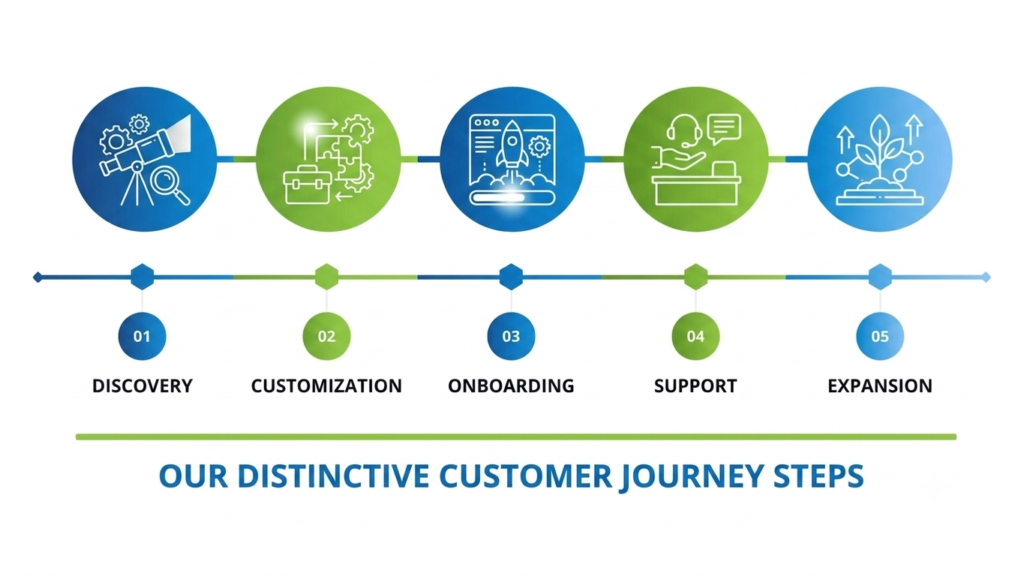
- Process Mapping: We analyze your existing purchasing flow to eliminate inefficiencies.
- Custom Workflow Design: We build custom approval matrices and budget guardrails tailored to your organization.
- Data Migration & Setup: We clean, structure, and import your existing vendor data, catalogs, and historical records.
- System Integration: We connect Zoho Procurement with your ERP, financial software, and third-party tools.
- Training & Ongoing Support: We provide hands-on team training and post-launch support for lasting success.
Streamline Your Procurement Lifecycle Today
Modern purchasing demands complete visibility, quick approvals, and tight spend control. Implementing Zoho Procurement equips your organization with the intelligence and automation needed to eliminate maverick spend and drive operational efficiency.
Ready to transform your source-to-pay process? Contact the experts at Quadric IT today to build a tailored Zoho Procurement solution that scales with your business.