
























How to set up SAP S/4HANA Public Cloud in SAP Cloud ALM
A step-by-step guide to setting up SAP S/4HANA Public Cloud in SAP Cloud ALM for a smooth, well-governed and efficient implementation.
By Rajeswari Rao

SAP Cloud ALM helps customers maintain seamless business operations by pinpointing disruption sources and speeding up resolutions, reducing downtime across all business processes.If you’re about to start your SAP S/4HANA Public Cloud setup, one of the first things you’ll do is create your implementation project inSAP Cloud ALM.
SAP Cloud ALM (opens in a new tab) is the central project execution platform for SAP Cloud implementations (opens in a new tab), providing a single place to manage tasks, scope, systems, and timelines. Whether you’re a partner project manager, customer project manager, or IT contact, this guide will walk you through setting up your project step-by-step – from adding team members and defining roles to scoping business processes and preparing deployment plans.
Step-by-Step Guide to Setting Up Your SAP S/4HANA Public Cloud Implementation Project in SAP Cloud ALM
SAP Cloud ALM helps customers maintain seamless business operations by pinpointing disruption sources and speeding up resolutions, reducing downtime across all business processes.
By the end of this blog, you’ll understand how to create an implementation project in SAP Cloud ALM using the SAP Activate methodology so you can enable transparency, collaboration, and structured execution across your project team.
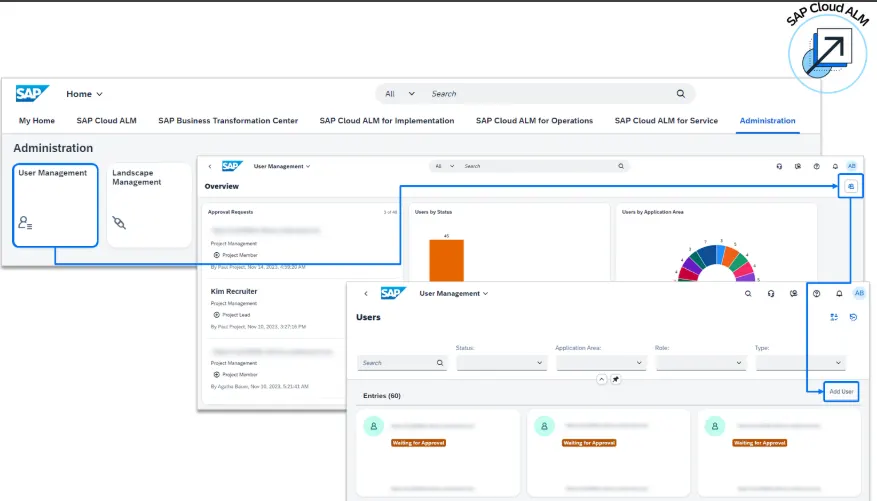
Step 1: Add Project Team Members in SAP Cloud ALM
Before you can start configuration, you need to ensure your project team has access to SAP Cloud ALM. This stage ensures your SAP S/4HANA Public Cloud setup is aligned with SAP Activate methodology.
- First, create project team members in SAP Cloud Identity Services.
- Then, in SAP Cloud ALM, assign them to your project.
- Give partner and customer project managers access first – they are responsible for setting up the project, defining scope, and assigning tasks.
Note: The IT Contact should eventually provide all team members access, but early access for project managers is critical for smooth setup.
Step 2: Define Project Roles
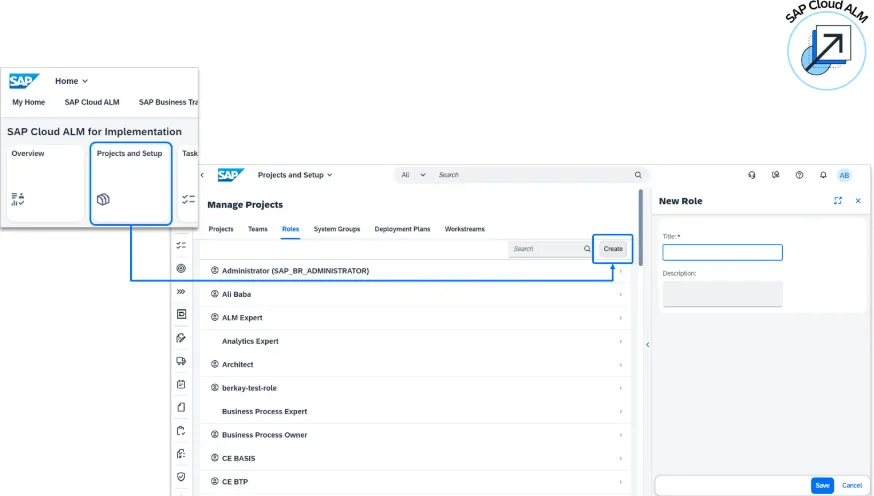
Next, structure your team with clear responsibilities.
- Review the standard roles available in Cloud ALM.
- Edit, delete, or create custom roles (for example, roles for Line of Business (LoB) experts in Finance, Sales, or Supply Chain).
- Assign each role to one or more users so that specific tasks (e.g., Finance configurations) are owned by the right experts.
Why it matters: Clear role definition ensures accountability and prevents bottlenecks during task execution.
Step 3: Create the Project with SAP Activate Roadmap
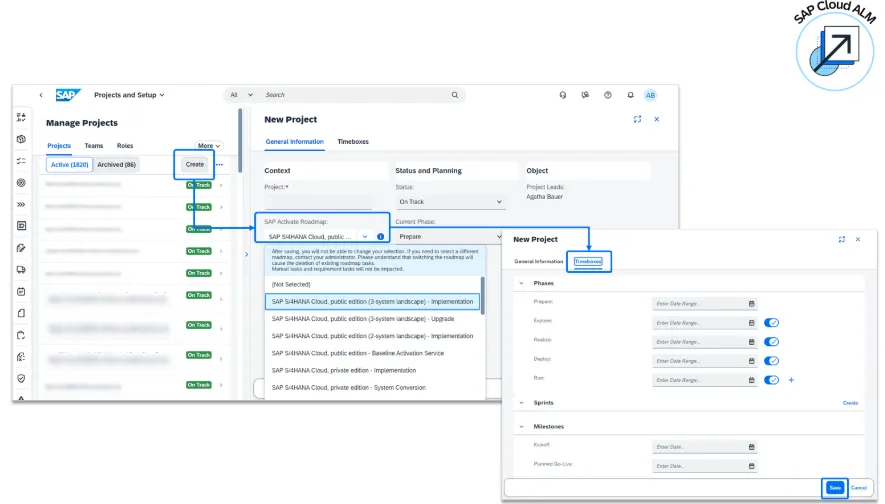
When creating your project, select the correct SAP Activate Roadmap:
SAP S/4HANA Cloud, Public Edition (3-system landscape) – SAP S/4HANA Cloud implementation
- Enter a project name.
- Go to the Timeboxes tab and set start and end dates for each project phase.
- Work backwards from the go-live date.
- Give extra time to the Explore phase for Fit-to-Standard workshops, as these usually take the longest.
Why timeboxes matter: They provide a visual overview of phase progress – showing days remaining and task completion rates.
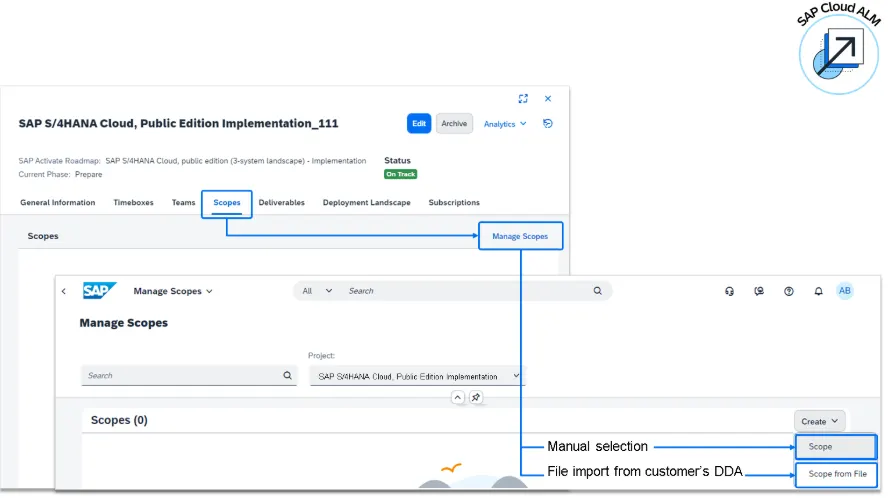
Step 4: Assign the Scope
Your project scope in SAP Cloud ALM should align with the Digital Discovery Assessment (DDA) completed during the Discover phase.
You can set the scope in two ways:
Option 1 – Manual Selection
- Go to Manage Scopes in Cloud ALM.
- Choose the latest SAP Best Practices package.
- Use the Process Scoping button to filter by country/region and business process group.
- Add processes from the DDA results to the scope.
Option 2 – Import from DDA
- Ask the customer executive sponsor to export the DDA file (Excel or JSON) from the Supply Chain of Selling app.
- In Cloud ALM, use Scope from file to import it.
Note: The DDA scope is a starting point — expect changes after Fit-to-Standard workshops.
Step 5: Set Up System Groups
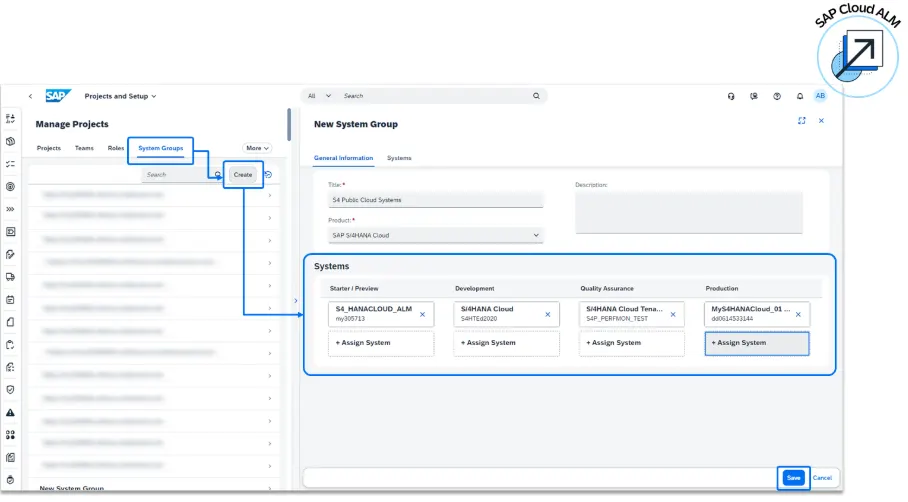
In SAP Cloud ALM, a System Group logically links all project-related systems:
- Starter
- Development
- Test
- Production
To create a system group
- In Projects and Setup, go to the System Groups tab.
- Click Create, name the group, and add your system IDs (ask the IT Contact if you don’t know them).
- Save and link it later to a deployment plan.
Benefit: Centralized tracking of deployments and events across the landscape.
Step 6: Create and Assign a Deployment Plan
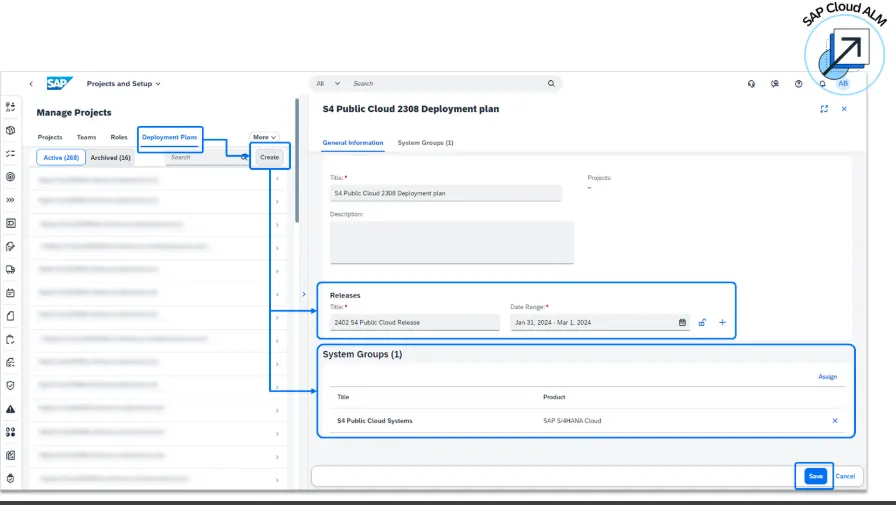
Deployment plans help you prepare for SAP S/4HANA Public Cloud quarterly releases.
To create a plan:
- In Projects and Setup, open the Deployment Plans tab.
- Click Create and enter relevant upcoming release dates.
- Assign your System Group to the plan.
As a best practice: during upgrades (roughly one month per release), pause critical configurations to assess new features and understand their potential impact on your scope.
Step 7: Assign the Deployment Plan to the Project
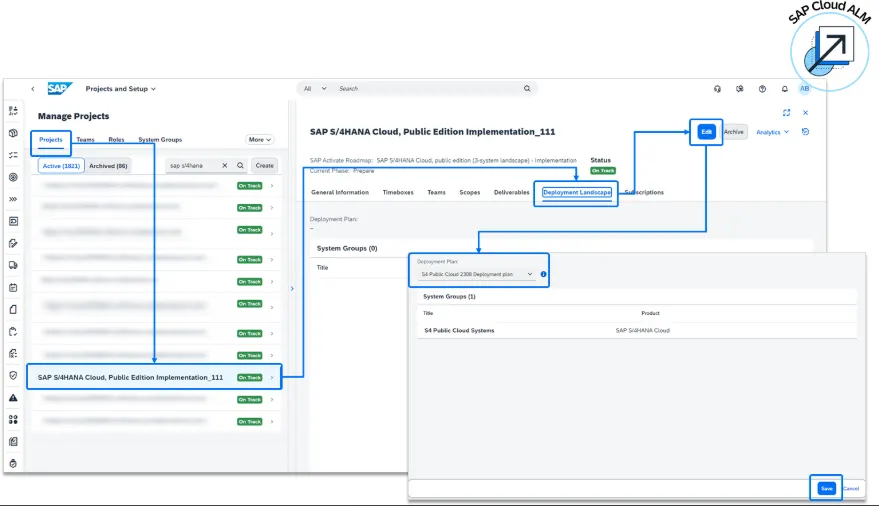
Finally, tie your deployment plan back to your overall project:
- Go to the Projects tab.
- Select your project and open the Deployment Landscape tab.
- Click Edit and assign the plan.
Key Takeaways
- SAP Cloud ALM is your single platform for managing SAP S/4HANA Public Cloud projects.
- Always start by adding key project managers and defining roles.
- Timebox planning ensures realistic delivery schedules.
- Start by aligning your scope with the DDA, and then remain flexible as insights emerge from the workshops.
- System groups and deployment plans help you manage technical landscapes and release cycles effectively.
Conclusion:
Setting up your SAP S/4HANA Public Cloud project in SAP Cloud ALM isn’t just about data entry – it’s about establishing the framework for successful delivery. By following these steps in SAP Cloud ALM, your SAP S/4HANA Public Cloud setup will be structured, efficient, and future-ready.
At Quadric IT, we specialize in guiding businesses throughSAP S/4HANA Public Cloud implementations.